Company Plan
The Company Plan helps you structure and manage your organization within the platform. It provides full visibility over requests, team hierarchies, user roles, and action history. Each user operates within a clearly defined scope, while managers and administrators can monitor and track all activities to ensure transparency and accountability.
User Roles
Super Manager
The main administrator of the company. They have full visibility over all teams and all requests. They can invite new members, promote or demote managers, transfer credits, and review detailed logs of all actions and transactions across the company.
Manager
Responsible for a specific team, with visibility over all requests made by team members. Managers can invite new members (who join as Readers by default) and manage team roles by promoting or demoting Contributors and Readers.
Contributor
An active member who can launch new requests using the company’s credits. Contributors can view accessible requests within their team or organization but have no administrative rights.
Reader
A passive team member who can only view requests and their results. Readers cannot launch new requests. This is the default role for new users invited by a Manager.
Invitations and Onboarding
How to invite new members
• If a Manager sends the invitation, the user joins the existing team as a Reader by default.
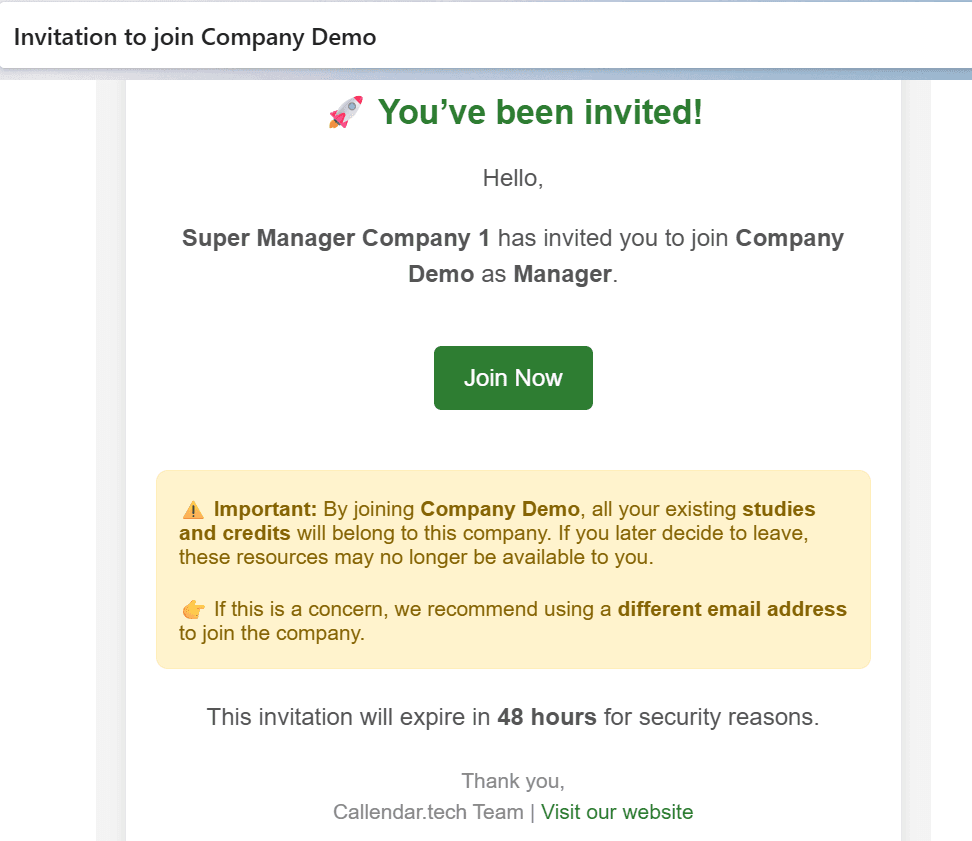
When an invitation is sent, the platform automatically delivers an email to the recipient. The email contains a secure link to accept the invitation. By clicking this link, the invited person is redirected to the Climate Vision platform where they must either:
- Create a new account if they are not yet registered (Sign Up).
- Log in with their existing credentials if they already have an account (Login).
Once this step is completed, the user is automatically added to the company with the role assigned in the invitation. From that moment, they can immediately access all studies and requests that are available to them based on their role and the visibility rules set by their managers.
Request Visibility Levels
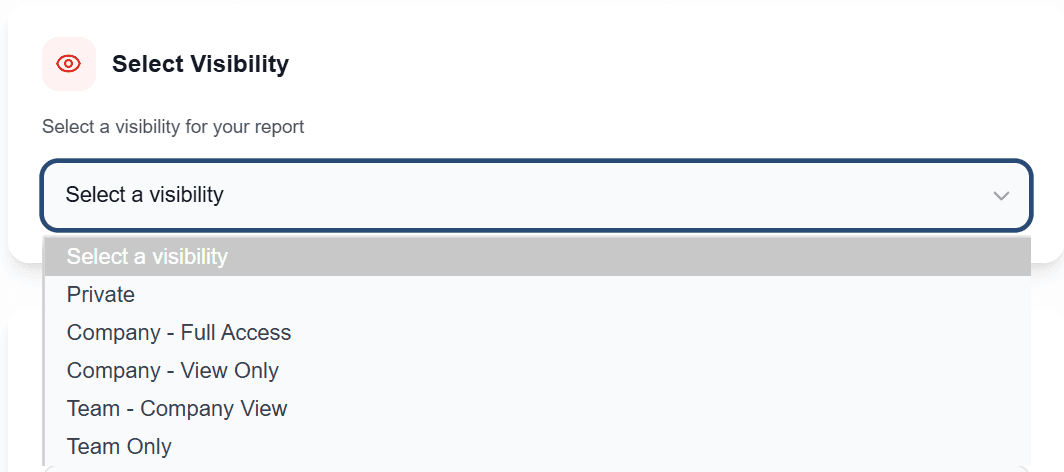
Private
The request is only visible to its owner and their managers. Download access is restricted.
Company – Full Access
All company members can view and download the results.
Company – View Only
All company members can view the request, but only the owner and managers can download the results.
Team – Company View
Visible to the whole company, but downloadable only by the team and its managers.
Team Only
Restricted to the owner and their team members for both viewing and downloading.
Company Information Page
All users have access to a summary page with the key information they are allowed to see. Super Managers can view all teams and members across the company, while Managers, Contributors, and Readers only see details related to their team.
Logs and Activity Tracking (Super Managers only)
Super Managers have access to a dedicated dashboard showing credit transactions, invitations, role changes, and user actions (such as launching or downloading requests). This ensures full transparency and reliable monitoring of company activity.
Update a Study
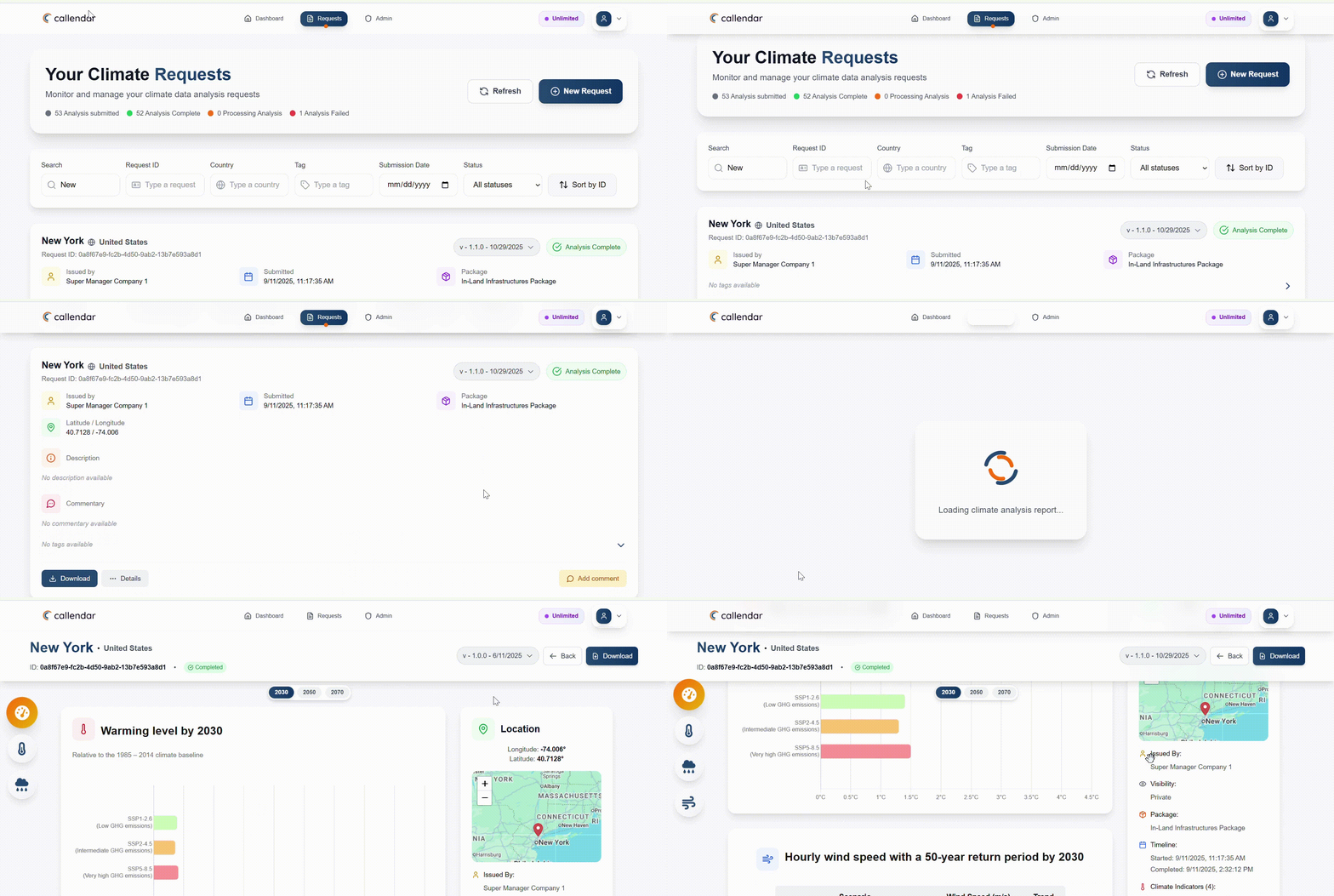
As climate data and our methodology are constantly evolving, we’ve added this feature to allow us to update your studies whenever there are significant changes in our approach.
This ensures that you always have access to the most up-to-date data and the latest version of our methodology.
Your studies will not be replaced; they will be enhanced. You’ll always have access to previous versions of your results. You can choose which version you want to view, and the results will update accordingly.
On the Requests page, the latest version of a study will always be shown at the top.
Frequently Asked Questions
Find answers and quick visual guides to manage your company and teams
To access the user management section, go to your Dashboard, then click on Company Info.
You’ll be redirected to your company workspace, where you can view all users, their roles, and associated details.
💡 You can also access it quickly by clicking on your profile icon (top right) and selecting Company Info from the dropdown menu.
The User Activity page gives Super Managers full visibility over company operations including credit transfers, invitations, user logins, and other key actions.
To access it, go to your Dashboard and click on User Activity.
💡 You can also open it from your profile icon (top right) by selecting User Activity in the dropdown menu.
There are two cases:
- Super Manager: When you invite a new member, a new team is automatically created, and that user becomes its Manager.
- Manager: When you invite a new member, they join your existing team as a Viewer.
To send an invitation:
- Go to Company Info from your Dashboard.
- Open the Invite New Members section.
- Enter the email of the person to invite.
An invitation email will automatically be sent.
When a Manager or Super Manager invites you, you’ll receive an email containing a link to join ClimateVision.
When accepting the invitation:
- If you already have an account → redirected to login.
- If not → redirected to sign up.
Once connected, you’ll automatically access your company’s shared resources.
Important:
- Use the same email address that received the invitation.
- If you already have a personal account, it’s better to use a different email to join your company.
👉 If your manager removes your access, all associated studies and credits will be reassigned to them.
To rename your team:
- Go to Account Settings via your profile icon.
- Click Edit Profile.
- Change the Team Name field.
- Save your changes.
To update a user’s role:
- Go to Company Info.
- Find the user and click Edit Role.
- Select the new role and confirm.
Note:
- Managers can promote or downgrade team members.
- Super Managers can reassign Managers.
- Regular users can’t modify roles.
To transfer or remove credits:
- Go to Company Info.
- Click Transfer Credits beside the user.
- Enter a positive (add) or negative (remove) amount.
Only Managers and Super Managers can do this.
To revoke a user’s rights:
- Go to Company Info.
- Find the user and click Revoke Rights.
- Confirm your choice.
Important:
- Revoking access transfers their credits and studies to the manager.
- Only Managers and Super Managers can revoke access.
Study visibility defines who can view or access its data. It’s set directly in the study creation form when launching a new study.
- Private: Visible only to the initiator and their managers.
- Company – Full Access: Visible and accessible to all company members.
- Company – View Only: Visible to everyone, but only the initiator and their managers can access full results.
- Team – Company View: Fully accessible to the initiator’s team, and visible (but not editable) to the rest of the company.
- Team Only: Restricted to the initiator’s team.
To modify visibility:
- Go to Requests page.
- Open the study details.
- Select a new visibility level.
- Confirm to apply.
You can enhance collaboration with tags and comments:
- Go to Requests.
- Find the study.
- Click Edit Tags or Add Comment.
- Save your changes.
If your account runs out of credits, you can request a top-up :
- Go to the Contact Form (available at the bottom of the page).
- Fill in the required information.
- Select “Low Balance – Recharge your credits” as the subject.
Our team will contact you promptly to complete the process.